One casual photo. A polished ID headshot.
Skip the studio—upload a selfie or everyday portrait. Generative AI renders a new head-and-shoulders ID-style shot (not just auto-crop) in minutes. Pick backdrop and aspect ratio, then download.
10K+
Trusted by users
50K+
Headshots created
~2–3 min
Typical generation time
Create your headshot in three steps
Three simple steps—AI renders your ID-style headshot
Upload
Choose a clear front-facing photo
Style
Pick background and format
Generate
AI processes your image
Drag and drop an image here, or click to browse
JPG or PNG, up to 10MB
Background color
Aspect ratio
Output canvas aspect ratio.
Your headshot will appear here after you complete the steps
Disclaimer: For everyday use (resumes, profiles, badges). Not recommended for official government documents like passports or visas.
See the results
How generative AI rebuilds a casual photo into a professional ID headshot
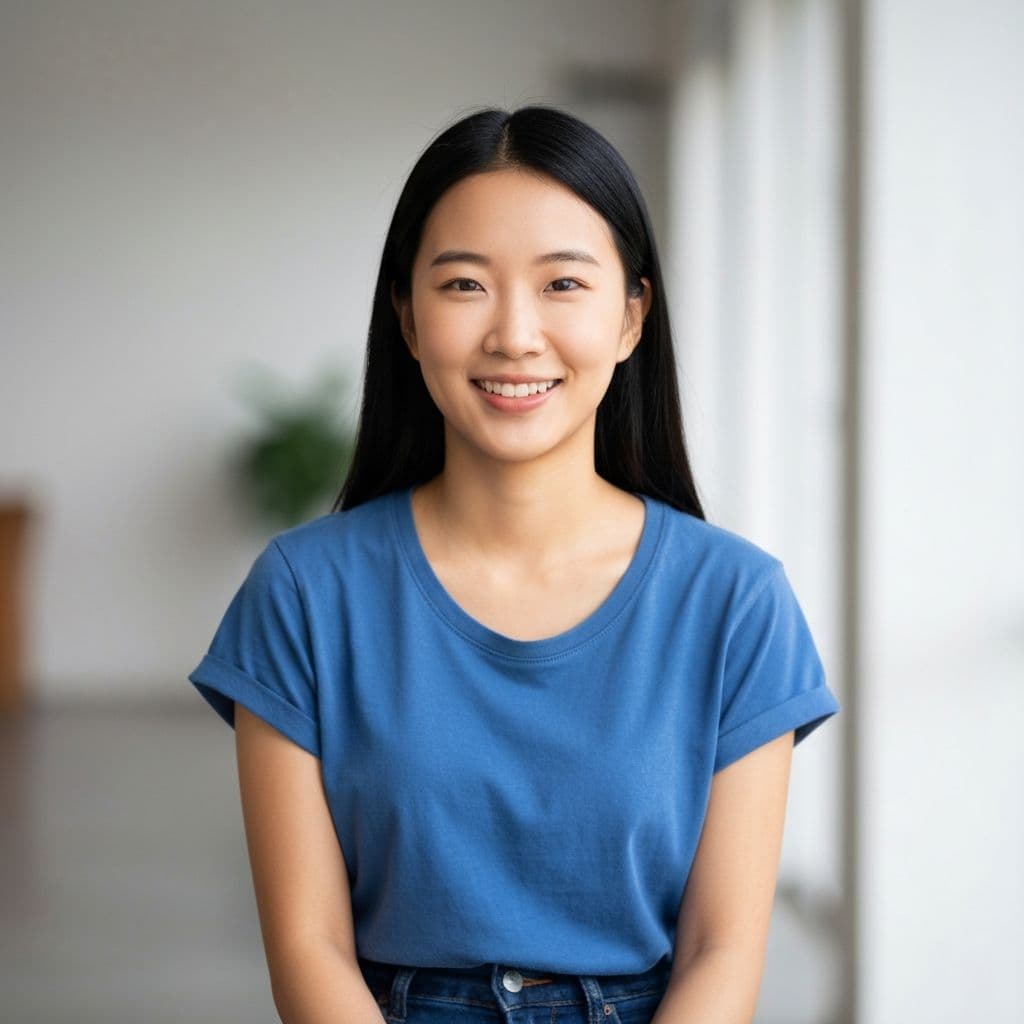
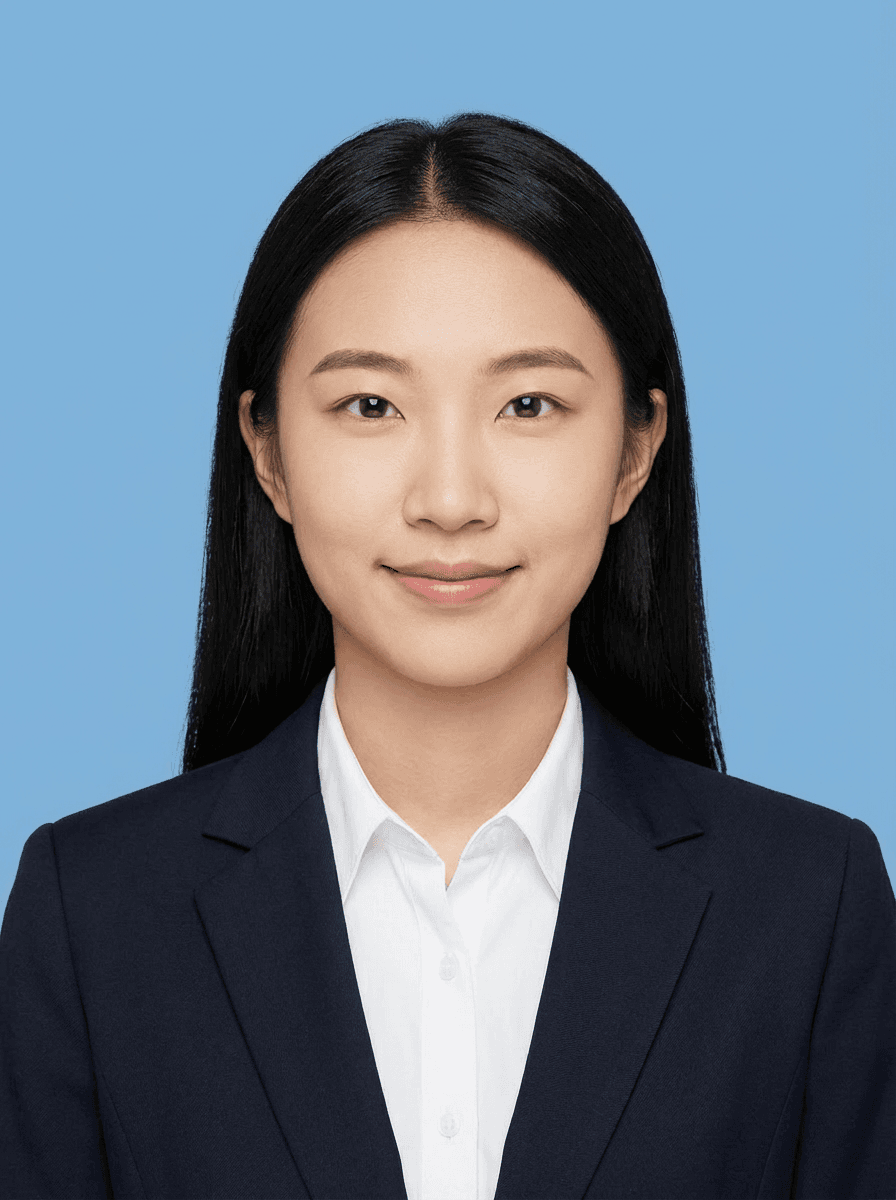
What is an AI ID Photo?
An AI ID photo is a professional headshot generated by artificial intelligence from a casual selfie or everyday portrait. Unlike traditional photo cropping tools that simply cut out the background, generative AI rebuilds the entire head-and-shoulders composition -- adjusting lighting, skin tone, pose alignment, and backdrop to produce a studio-quality result.
Key Facts
- 160%+ faster than visiting a photo studio (2-3 minutes vs. 30+ minutes including travel)
- 280% cheaper than professional studio sessions (starting at a few dollars vs. $15-$50 per visit)
- 36 backdrop options -- blue, white, red, gray, cream, navy -- covering most resume and badge requirements
- 45 aspect ratios -- 3:4 (closest to standard 25x35mm), 1:1, 4:5, 2:3, 4:3
- 5High-resolution PNG output suitable for both online submissions and print
AI ID Photo vs. Traditional Studio
| Feature | AI ID Photo (PhotoID AI) | Photo Studio |
|---|---|---|
| Time | 2-3 minutes | 30-60 minutes (incl. travel) |
| Cost | From $2-3 per session | $15-$50 per visit |
| Location | Anywhere, any device | In-person appointment |
| Backdrop options | 6 colors, instant switch | Limited, may cost extra |
| Retakes | Unlimited with credits | Often charged per session |
| Available | 24/7 online | Business hours only |
How to Create an AI ID Photo in 5 Steps
A complete step-by-step guide to generating your professional headshot
Step 1: Upload Your Photo
Take a clear, front-facing selfie with your phone or upload an existing portrait. Supported formats: JPEG, PNG, WebP (up to 10MB). For best results, ensure your face is fully visible with even lighting and no obstructions like hats or sunglasses.
Step 2: Choose Your Background
Select from 6 professional backdrop colors:
- Blue -- most common for Chinese ID photos and employee badges
- White -- standard for passports, visas, and international documents
- Red -- traditional for Chinese official documents and wedding certificates
- Light Gray -- modern, professional look for resumes and LinkedIn
- Cream -- warm, natural tone for profile photos
- Navy -- formal, corporate appearance
Step 3: Select Aspect Ratio
Pick the output format that matches your use case:
- 3:4 (Portrait) -- closest to standard Chinese one-inch (25x35mm), ideal for most ID photos
- 1:1 (Square) -- perfect for social media profiles and online accounts
- 4:5 (Portrait) -- optimized for Instagram and social platforms
- 2:3 (Portrait) -- common for European-style photo prints
- 4:3 (Landscape) -- suitable for wide-format applications
Step 4: AI Generation
Click "Generate" and our AI model processes your image in 2-3 minutes. The generative AI rebuilds your head-and-shoulders portrait -- adjusting lighting, skin tone, and alignment -- while keeping your natural features intact. Keep the tab open during processing.
Step 5: Preview and Download
Review your generated headshot. Free users get a watermarked preview. To download the clean, high-resolution PNG without watermark, purchase generation credits (starting at just a few dollars for multiple uses). Not satisfied? Use your credits to regenerate with different settings.
Popular Use Cases
One tool for all your everyday ID photo needs
Resume / CV Photo
Clean, professional headshot that makes your application stand out. White or light gray background recommended.
Employee Badge / ID Card
Standard ID-style photo for workplace badges and company directories. Blue or navy background most common.
Exam Registration
Meet photo requirements for civil service exams, professional certifications, and university admissions.
LinkedIn & Social Profiles
Professional-looking profile photo for LinkedIn, Twitter, and other social platforms without a studio visit.
Visa & Passport Application
White background, centered composition. Note: verify specific requirements with the issuing authority before official submission.
Student ID & School Records
Quick and affordable ID photos for student cards, yearbooks, and school registration forms.
Why use our AI ID photo generator?
A professional, fast, and convenient ID-photo solution—save up to about 80% of the time and cost of a studio visit.
Smart AI processing
Generative AI repaints a new portrait from your photo—lighting and backdrop—not just crop-and-cutout on the original frame.
Multiple backdrops and aspect ratios
Switch among six common solid backdrops and several aspect ratios in one click—the default follows common Chinese one-inch print semantics, so the model delivers a standardized head-and-shoulders shot without you memorizing size charts.
Fast generation
After upload, a cloud large model renders your ID-style photo—usually about 2–3 minutes per run, with no studio appointment.
High-resolution download
High-resolution output for both printing and online submissions.
Privacy protection
HTTPS in transit; each generation is processed on the server and we do not keep your upload as a long-term gallery on this site. See the Privacy policy for details.
Typical use cases
Résumés, exam registration, employee records, and other common ID-photo needs in China; not aimed at passport, visa, or other specialized consular specifications.
Frequently asked questions
What are the requirements for the photo I upload?
Use a clear, front-facing portrait with an unobstructed face and even lighting. JPEG, PNG, and WebP are supported, up to 10MB per file. We don’t run real-time face detection or sharpness scoring—output quality depends on your source image.
Can I use the generated ID photo for formal purposes?
Suitable for résumés, exam registrations, employee badges, profile photos, and similar everyday cases. You can choose multiple aspect ratios (3:4 portrait is closest to common Chinese one-inch 25×35mm-style prints, plus 1:1, 4:5, 2:3, 4:3) and six solid backdrops (blue, white, red, gray, cream, navy). We do not guarantee compliance with passport, visa, or other specialized consular specifications.
Is my photo data secure?
We use HTTPS in transit; during generation your image is sent to a third-party AI service for processing. We do not operate your uploads as a long-term public gallery; retention, storage under paid features, and how downloads work are described in the Privacy policy.
What format do I get? How do resolution and watermarks work?
By default you receive a high-resolution PNG; pixel dimensions follow your chosen aspect ratio and the model output, suitable for online submissions and cropping before print (you or the print shop set DPI). Trial delivery may be watermarked; paying to unlock or downloading with available credits gives the clean version of the same generation—not a separate “higher resolution tier.”
Which payment methods are supported?
Recharge and checkout go through PayPal—you can use your PayPal balance or supported cards and methods (see checkout). If paid features are not enabled on this deployment, you can generate and download without payment.
Is PhotoID AI free to use?
You get one free trial generation (watermarked preview). To download the clean, watermark-free version, you can purchase generation credits. Pricing starts at just a few dollars for multiple uses—much cheaper than a studio visit. If monetization is not enabled on this site, all generations are free.
Can I use PhotoID AI on my phone?
Yes. The website works on any modern browser—Chrome, Safari, Firefox—on both desktop and mobile. Simply open the site, upload a photo from your camera roll or take a new picture, and the AI generates your headshot. No app installation required.
How is this different from a simple photo cropping tool?
Traditional cropping tools just cut out the background and resize your original photo. PhotoID AI uses generative AI to completely rebuild a new head-and-shoulders portrait from your photo—adjusting lighting, pose alignment, and backdrop to create a professional ID-style shot. The result looks like you posed for it, not like a casual selfie that was trimmed.
How do I print the generated ID photo?
Download the high-resolution PNG file and take it to any print shop. Tell them the desired size (e.g., 1-inch / 25×35mm for common ID photos in China). The print shop will handle DPI settings and cropping. You can also print at home if you have a photo printer—just set the correct dimensions in your print dialog.
Can I change the background or aspect ratio after generation?
Each generation is tied to the background and aspect ratio you selected. If you want a different look, simply upload the same photo again and choose a different style—there is no additional cost if you have unused credits. The AI will generate a fresh headshot with your new settings.
Can I use the generated photo for a passport or visa application?
Our tool is designed for everyday ID-photo needs like resumes, exam registrations, and employee badges. We do not guarantee compliance with strict government specifications for passports, visas, or consular documents. If you need an official photo for those purposes, please check the specific requirements of the issuing authority.
What are the standard ID photo sizes by country?
Different countries use different ID photo dimensions. Common standards include: China one-inch (25x35mm), China two-inch (35x49mm), US passport (2x2 inches / 51x51mm), UK/EU passport (35x45mm), Japan (35x45mm), India (35x45mm), and Australia (35x45mm). Our 3:4 aspect ratio is closest to the standard one-inch format. For exact pixel dimensions, check the specific requirements of the organization you're submitting to.
Is AI-generated ID photo legally acceptable?
For everyday uses like resumes, employee badges, student IDs, and online profiles, AI-generated headshots are widely accepted. However, for official government documents such as passports, visas, and national ID cards, many countries require photos taken within the last 6 months at an authorized location. Always check the specific requirements of the issuing authority. Our tool is designed as a convenient solution for everyday needs.
What makes PhotoID AI different from free online ID photo tools?
Free online tools typically only crop and resize your existing photo, or use simple background removal (cutout). PhotoID AI uses generative AI to completely rebuild your head-and-shoulders portrait from scratch -- creating new lighting, adjusting pose alignment, and rendering a professional ID-style composition. The result looks like you posed for a studio photo, not like a cropped selfie. We also offer 6 backdrop colors and 5 aspect ratios in a single tool.